How Foreigners and Non-Residents Can Access Brazil’s Gov.br Portal Using a CPF

Many foreigners and Brazilians living abroad often ask the same question: “Can I access the Gov.br portal even if I live outside Brazil?”
The answer is yes — as long as you have a valid CPF (Cadastro de Pessoa Física).
The Gov.br portal is Brazil’s official gateway to digital public services, including Receita Federal (Federal Revenue Service), e-CAC, INSS, CadÚnico, employment services, health records, and much more. The CPF is the key that enables access.
This guide explains, step by step, how foreigners and non-residents can create a Gov.br account, what requirements exist, how to maintain an active CPF from abroad, and which digital services are available.
Table of Contents
What Is Gov.br and Who Can Use It?
Gov.br is the unified digital identity system used by the Brazilian federal government. It centralizes hundreds of services and allows users to log in using a verified digital account.
Anyone with an active CPF can use Gov.br, including:
- Foreign citizens who have a Brazilian CPF
- Brazilians living abroad
- Dual citizens
- Non-residents with tax or financial ties to Brazil
Your nationality and location do not affect your ability to create an account.
The CPF number is the primary identifier, and it is all you need to begin.
How Foreigners Can Create a Gov.br Account (Step by Step)
Creating an account is simple and can be done entirely online, no matter where you live.
Step 1. Access the Gov.br Account Creation Page
Visit the official access portal:
acesso.gov.br
or any government page that prompts for a Gov.br login.
Step 2. Enter Your CPF Number
The system will request your CPF to start the identity verification process.

Step 3. Provide Your Personal Information
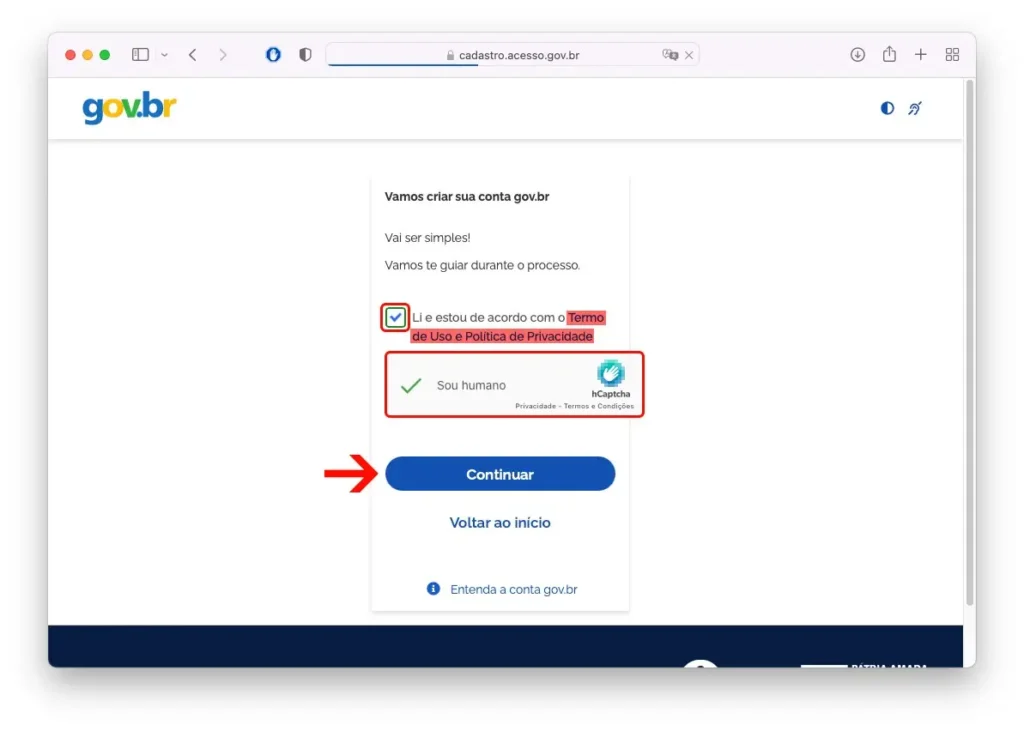
You will be asked to confirm details linked to your CPF registration, such as:
- Full name
- Date of birth
- Mother’s name
- Contact information (email or phone)
This is required to ensure your identity and protect your account.
Step 4. Create Your Password
After verification, set up a secure password for your Gov.br account.
Step 5. Log In to Gov.br
Once registered, use your CPF and password to access digital services, including:
- Federal tax services
- The e-CAC portal
- Federal Revenue applications
- INSS and social services
Gov.br Account Levels: Bronze, Silver, and Gold
Gov.br accounts have three security levels:
- Bronze – basic access
- Silver – intermediate, required for many services
- Gold – highest level, full access to sensitive data
Upgrading your account level may require extra verification, such as:
- Facial recognition through official apps
- Bank verification (if you have a Brazilian bank account)
- Document verification
Many foreigners can reach the Silver or even Gold level using the official identity verification methods.
Important: Foreigners Must Update Their CPF Annually
Foreigners and Brazilians living abroad are required to update their CPF registration every year.
Failing to do so may result in:
- CPF suspension
- Difficulties accessing Gov.br
- Inability to use services like e-CAC or Federal Revenue apps
How to Update Your CPF From Abroad
Use one of the official apps:
- Receita Federal App
- CPF Digital App
These apps allow you to update your registration, correct personal information, and keep your CPF active.
Useful Apps for Managing Your CPF and Gov.br Account
1. Receita Federal (Official App)
This app allows you to:
- Update CPF information
- Check your CPF status
- Access Federal Revenue services
2. CPF Digital
Useful for:
- Digital CPF access
- Facial recognition
- Annual updates
Both applications work for users living outside Brazil.
What to Do if You Have Problems Accessing Gov.br Abroad
If you encounter issues while creating your Gov.br account or updating your CPF, you should contact:
- The Brazilian Embassy or Consulate in your country
- The official Federal Revenue (Receita Federal) support channels
- The Gov.br help center
Brazilian consulates handle CPF services for citizens and foreigners living abroad and can assist with corrections or reactivations when necessary.
 Open in ChatGPT
 Open in Claude
 Open in Perplexity